
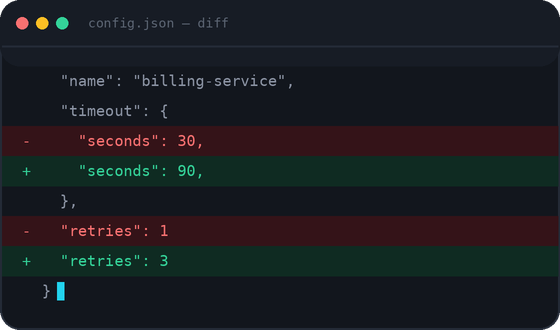
You changed one line in a 400-line config file. Now you need to find it. Or maybe a client sent back a “slightly edited” contract, and “slightly” turned out to mean twelve tracked changes buried across four pages. Or you’re a developer staring at two versions of a JSON response, trying to spot the one field that broke production.
This is the exact problem a diff checker solves. Instead of reading two documents line by line and hoping your eyes don’t glaze over, a diff tool does the comparison for you — instantly, visually, and accurately.
In this guide, we’ll walk through what a diff checker actually is, how to use one properly, and how our free tool — the Diff Checker — handles everything from plain text to JSON, HTML, CSS, and JavaScript, right in your browser.
What Is a Diff Checker?
A diff checker (short for “difference checker”) is a tool that compares two pieces of text, code, or files and highlights exactly what changed between them. It shows you additions, deletions, and modifications — usually with color coding — so you don’t have to manually scan every line.
The term comes from the Unix diff command, a utility that’s been part of software development since the 1970s. Developers have relied on diffing to track changes in source code for decades, and the same logic now powers everything from Git version control to Google Docs’ “suggest edits” mode.
At its core, a diff checker answers one simple question: what’s different between version A and version B?
Why People Compare Text
People compare text for more reasons than you’d expect. A few common ones:
- A developer wants to see what changed between two code commits before merging.
- A student is checking their revised essay against the first draft to see what the professor’s feedback actually changed.
- An SEO professional is comparing old page content against a new draft before publishing an update.
- A QA tester is verifying that a bug fix didn’t accidentally alter unrelated code.
- A legal or business team is reviewing a contract redline to catch every edit, not just the obvious ones.
- A writer is comparing two versions of an article to merge the best parts of each.
In every case, the manual approach — reading both documents side by side — is slow and error-prone. Human eyes are good at reading; they’re not great at spotting a single missing comma in a 2,000-word document. That’s exactly the kind of task a diff checker is built for.
How Our Diff Checker Works
The Diff Checker tool is designed to be as simple as possible, without stripping out the features that make comparison actually useful. Here’s the basic flow:
- Paste your original text into the left panel.
- Paste your modified text into the right panel.
- Click Compare.
- Instantly see the differences, highlighted line by line and character by character.
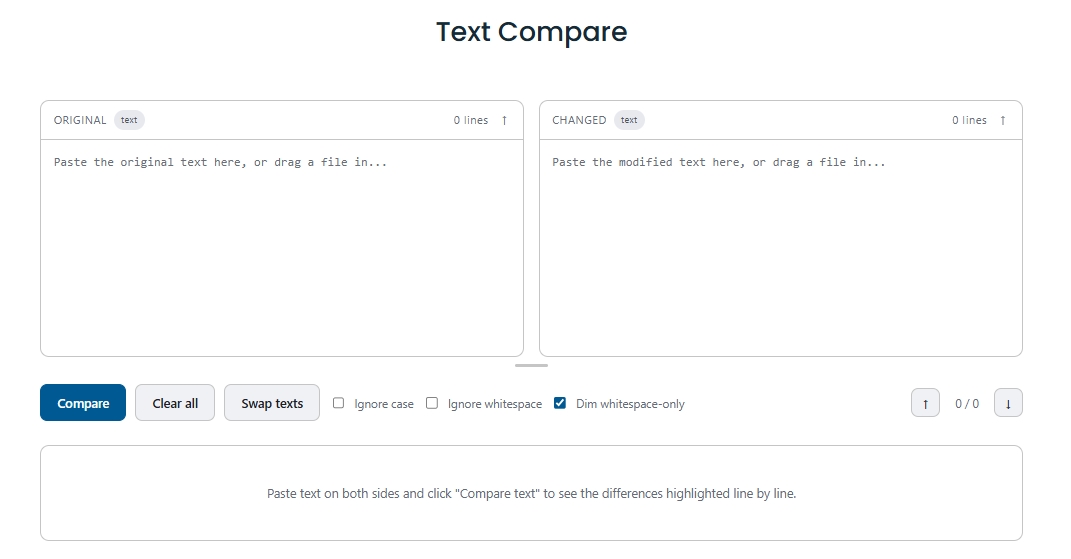
That’s it. There’s no file upload step, no account creation, and no waiting around for processing. The comparison runs directly in your browser, which means your text never has to leave your device to be analyzed.
Behind the scenes, the tool uses a diff algorithm to break both texts into tokens (lines, words, or characters, depending on the mode) and then calculates the shortest set of changes needed to turn version A into version B. This is the same conceptual approach used by tools like GNU diff and Git’s internal diffing engine — it’s a well-established, battle-tested method for comparison, not a gimmick.
Key Features of the Diff Checker
Not all diff tools are built the same way. Here’s what makes this one worth bookmarking.
Side-by-Side Comparison
The tool displays both versions of your text next to each other, so you can see the original and the edited version in context — not just a list of isolated changes. This matters when you need to understand why something changed, not just that it changed.
Character-Level Difference
Sometimes the difference isn’t a whole line — it’s one character. A single misplaced semicolon in CSS, or a typo like “form” vs. “from” in code, can be the entire bug. Character-level diffing catches these small but critical edits that line-level tools miss entirely.
Line-by-Line Comparison
For larger documents, line-level comparison gives you a faster overview: which lines were added, which were removed, and which stayed the same. This is the view most developers reach for first when reviewing a large file.
Fast Processing
Because the comparison happens client-side in your browser, there’s no server round-trip delay. Paste your text and the results appear almost immediately, even for fairly large documents.
Browser-Based, No Installation
You don’t need to download software, install a plugin, or set up a command-line tool. If you have a browser, you have a diff checker. This makes it accessible on a work laptop, a personal machine, or even a locked-down office computer where you can’t install new software.
Privacy-First Design
Because processing happens in your browser rather than on a remote server, your content isn’t uploaded or stored to run the comparison. This is particularly important if you’re comparing sensitive material — internal code, unpublished content, or business documents you’d rather not put through a random third-party server.
Unlimited Usage
There’s no daily cap, no “you’ve used your 3 free comparisons” wall, and no premium tier gating basic functionality. Compare as much text as you need.
Mobile-Friendly Interface
The tool works on phones and tablets, not just desktop browsers. If you need to quickly check a difference while you’re away from your main machine, it still works.
Clean, Distraction-Free Interface
No pop-ups, no clutter, no ten banner ads competing for your attention while you’re trying to concentrate on a comparison. Just the two text panels and the diff output.
Real-World Use Cases
A diff checker isn’t just a “developer tool.” Here’s who actually uses one day to day.
Developers
Comparing two versions of a function, checking what a teammate changed in a pull request, or verifying that a refactor didn’t alter logic — diffing is baked into modern software development. Even outside of Git, a standalone diff checker is useful for quick, one-off comparisons that don’t need a full version control setup.
Students
Comparing an essay draft against the revised version after feedback, or checking two research notes for consistency, helps students see exactly what they changed and why it mattered for their grade.
Writers and Editors
Article revisions rarely happen in one clean pass. A diff checker lets a writer or editor see precisely which sentences were reworded, which paragraphs were cut, and which new sections were added — much faster than re-reading the whole piece from scratch.
SEO Professionals
Before republishing an updated page, SEO teams often want to confirm exactly what content changed — new keywords, restructured headings, updated meta descriptions — without accidentally wiping out content that was already ranking well.
Businesses and Legal Teams
Contract review often comes down to spotting the two or three clauses that actually changed between drafts. A diff checker turns a tedious manual read-through into a five-second visual scan.
Diff Checker vs. Other Online Tools
Most online diff tools follow the same basic idea: paste two texts, see the difference. Where tools tend to diverge is in the details — how much you’re allowed to compare for free, whether your content is uploaded to a server, how the interface handles code versus plain text, and whether the tool works well on mobile.
Some tools require account creation before you can use core features. Others cap the amount of text you can compare unless you upgrade to a paid plan. Some are built primarily for plain text and struggle with formatted code or structured data like JSON.
Our approach with the Minify CSS JS Diff Checker is to keep the tool genuinely free and open: unlimited comparisons, no account wall, and support for code and data formats alongside plain text — all processed in your browser rather than a remote server.
Frequently Asked Questions
Conclusion
Comparing two versions of anything — a script, a contract, an essay, a config file — shouldn’t require squinting at two open tabs and hoping you don’t miss something. A diff checker takes that manual, error-prone process and turns it into a five-second visual scan.
Whether you’re a developer reviewing code, a student checking a revised draft, a writer comparing article versions, or a QA tester validating a build, the Diff Checker gives you a fast, private, and completely free way to see exactly what changed — right in your browser, with no account and no upload required.
Try it now: paste your original and modified text into the Diff Checker tool and see your differences highlighted instantly.
