
Compare text without guessing what changed
A diff checker is a tool that lines up two versions of the same content — a paragraph, a config file, a block of JavaScript, a contract clause — and shows you precisely what got added, what got removed, and what got edited in between. Instead of reading both versions top to bottom and hoping you catch the difference, you paste them in, hit compare, and the tool does the line-by-line and word-by-word work for you.
Text Compare
What Is a Diff Checker?
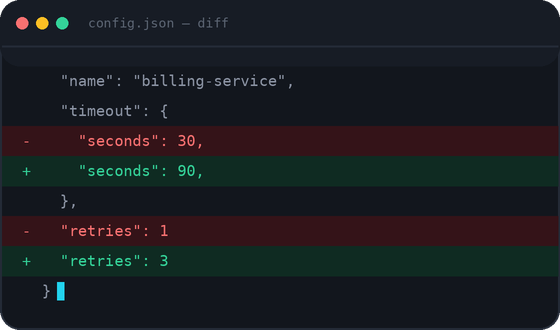
A diff checker compares two blocks of text and highlights every difference between them – the same way Git shows you a diff, except with no repository, terminal, or setup required. Paste your original text on one side, the edited version on the other, and it lines them up and marks what was added, removed, or changed.
Most people reach for one at a moment when they can’t afford to miss something: merging a branch and checking if a config value quietly moved, comparing a second draft of a document, or staring at an API response fairly sure a field changed between builds. Scanning that by eye is slow and unreliable once the text runs longer than a screen.
How It Works, Under the Hood
The comparison runs entirely in your browser using a longest-common-subsequence algorithm – the same family used by Git to build a unified diff. When a line is edited rather than replaced outright, the tool highlights the specific words that changed inside it. If both texts are valid JSON, it can switch to a structure-aware mode that compares keys and values instead of raw lines, so reordering or reformatting won’t register as a false change.
Benefits at a Glance
- See every change instantly instead of hunting for it manually
- Works on code, plain text, JSON, XML, or any structured file
- Nothing is uploaded – your content stays on your own device
- No installation, no account, no limit on how much you paste
- Built for repeated, everyday use, not a one-time demo
Common Ways People Use This
Code review
Paste a pull request’s before-and-after to see exactly what changed without pulling the branch locally.
Merge conflicts
Compare two conflicting versions side by side before deciding which lines to keep.
Config drift
Check a config file across dev, staging, and production to catch a value that quietly changed.
Debugging regressions
Compare a working version against a broken one to isolate exactly what changed.
Contract redlines
Compare two drafts of an agreement or document to see which paragraphs actually moved.
API responses
Compare two JSON payloads and ignore formatting or key-order noise entirely.
Client-Side vs Server-Side: Why It Matters
Most online diff checkers send both pieces of text to a server, compare them there, and send the result back – invisible to most people, until you think about what’s usually being pasted in: API keys, credentials, unreleased code, customer data. This tool doesn’t do that. Every part of the comparison, including JSON parsing and word-level highlighting, runs in JavaScript inside your browser tab. There’s no upload endpoint for your text to hit in the first place – closing the tab clears everything.
Diff Checker vs Alternatives
| Tool | Runs in browser | Install | JSON-aware | Best for |
|---|---|---|---|---|
| This Diff Checker | Yes | No | Yes | Fast, private text / code / JSON comparisons |
| Diffchecker.com | Partial | Optional | No | Comparing files, images, or PDFs |
| WinMerge | No | Yes (Windows) | No | Comparing entire folders on Windows |
| Meld | No | Yes | No | Full visual merge tool, not just a diff |
| Beyond Compare | No | Yes (paid) | Limited | Large codebases compared regularly |
Everything You Need
Fast Comparison
Results appear the moment you click Compare – no processing delay, even with long documents.
100% Browser Based
No backend involved. The comparison logic executes in JavaScript inside your browser tab.
Privacy Friendly
Your text never touches a server. Close the tab and nothing is stored anywhere.
No Upload Required
Paste or drag a file straight into the panel – there’s no upload queue at all.
Highlight Changes
Additions and deletions are color coded, with word-level highlighting inside edited lines.
Line by Line Comparison
Every line gets its own row with a line number, so you can reference exactly where a change is.
Word Comparison
When a line is edited, the tool marks the specific words that differ instead of the whole line.
Smart JSON Diff
Detects JSON automatically and compares by key and value, ignoring formatting noise.
Unlimited Usage
Compare as many times as you want — no daily cap, no premium tier on basic use.
Free Forever
No paywall on the core comparison feature. Built to stay free.
Developer Friendly
Detects code syntax and lightly highlights keywords, strings, and comments.
Responsive Design
The layout adapts from a wide monitor down to a phone without losing readability.
How It Works
Drop your first version into the left panel, or upload a file directly.
Add the updated version into the right panel, or drag a file straight onto it.
The tool runs the comparison instantly and builds a merged view of both texts.
Added lines are green, removed lines are red, and edited lines show the exact words that changed.