
JavaScript Minifier
Minify JS online – strip comments, collapse whitespace, shrink file size. Browser-based, zero uploads, zero tracking.
What Is a JavaScript Minifier?
A JavaScript minifier takes source code – complete with comments, indentation, and generous spacing – and strips out everything the browser’s JavaScript engine doesn’t actually need. The result is a functionally identical file that can be 30 to 60 percent smaller than the original.
When a browser downloads your page, every kilobyte counts. Larger scripts mean longer parse times, delayed rendering, and users who leave before your content appears. Minifying your JS is one of the most direct levers you have over frontend performance.
This tool runs entirely in your browser. There’s no file upload, no backend processing, and no server that ever sees your code. Paste it in, click Minify, and the output is ready to copy or download – instant, private, and free.
Whether you’re working on a small utility script or a large application bundle, the principle is the same: ship the smallest correct code you can. Minification is where that starts.
Why Minify JavaScript?
Comments and whitespace are for humans. The JavaScript engine processes tokens, not formatting – every space, tab, and newline in your source file is discarded before a single instruction runs.
In a typical production codebase, those discarded bytes add up quickly. A 200KB script might carry 40KB of comments and 30KB of indentation. That’s 70KB downloaded and parsed by every visitor, for nothing.
Beyond raw speed, smaller files improve your Core Web Vitals. Largest Contentful Paint and Total Blocking Time both benefit directly from faster script delivery – and since Google uses Core Web Vitals as a ranking signal, minification is an SEO advantage too.
- Faster page loads – less data transferred, quicker script execution start
- Lower bandwidth costs – especially on CDNs billed per byte
- Better mobile experience – critical on constrained connections
- Improved cache efficiency – smaller files fit easily into browser caches
- Better Core Web Vitals – directly influences LCP and TBT scores
How JavaScript Minification Works
Minification is not compilation and it’s not obfuscation. It’s a precise, character-level transformation that preserves your program’s complete semantics while eliminating unnecessary syntax.
What gets removed
- Single-line comments – everything from
//to the end of the line - Block comments – everything between
/*and*/, including multi-line JSDoc blocks - Leading and trailing whitespace – per-line indentation and trailing spaces
- Redundant newlines – blank lines collapsed or removed entirely
- Unnecessary semicolons – where ASI rules make them safe to drop
What is always preserved
- String contents – spaces inside
"hello world"are meaningful and untouched - Regular expressions – whitespace in
/foo bar/is part of the pattern - Template literals – whitespace in backtick strings affects output
- Operator spacing – operators and operands are always separated correctly
- License comments –
/*! ... */bang-comments are preserved for legal compliance
What a bundler-level minifier does differently
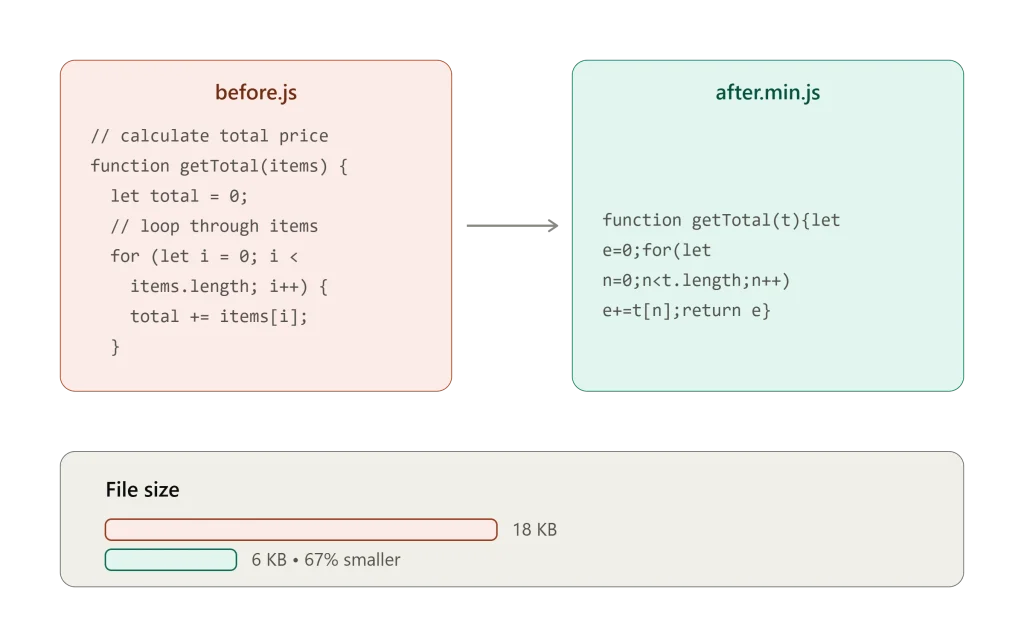
Tools like Terser or UglifyJS, usually run as part of a build step (webpack, Vite, esbuild), go further than basic minification – they rename variables to single letters, strip out code that’s never used (dead code elimination), pre-calculate fixed values (constant folding), and inline small functions. This minifier sticks to safe, reversible whitespace-and-comment stripping so you can paste code straight from your editor without wiring up a build tool.
What This Tool Offers
Instant Processing
Results in milliseconds regardless of file size. No waiting, no progress bars.
Fully Private
Your code runs in your browser tab. Zero server requests, zero logging, zero data retention.
Live Statistics
Original size, minified size, bytes saved, and percentage reduction – calculated instantly.
One-Click Copy
Copy the entire minified output to your clipboard with a single button click.
How to Use the JS Minifier
Two steps, about ten seconds
Drop your JS into the box on the left. No file upload, nothing leaves your browser.
Grab the minified output on the right, or download it straight as a .js file.
What Minification Does for Page Speed
Minification is one of the highest-leverage performance wins available. It compounds with server compression and browser caching to dramatically reduce the real cost of loading JavaScript.
Reduced Transfer Size
Fewer characters means fewer bytes over the network. A 300KB file with 40% whitespace/comment overhead becomes ~180KB – and that’s before gzip or Brotli compression, which compounds the savings further.
Faster Script Downloads
On a typical 3G mobile connection (1.6 Mbps), a 200KB script takes ~1 second to download. The same logic at 110KB after minification takes ~0.55 seconds – half a second saved before your code runs a single line.
Improved Caching
Smaller files fit more comfortably in browser caches, CDN edge caches, and HTTP/2 push budgets. A file that fits in cache on the first visit costs nothing to “download” on repeat visits – minification makes that threshold easier to meet.
Better Core Web Vital
Google’s Largest Contentful Paint (LCP) and Total Blocking Time (TBT) are directly affected by how quickly scripts are delivered and parsed. Minified scripts reduce both – and both are official Google Search ranking signals.